Install MT4 Indicator
How to install MT4 Indicator in MetaTrader 4 platform?
Learning how to install MT4 indicators is the first step toward customizing your trading platform. Whether you are using a custom script or a professional tool, knowing how to install MT4 indicators correctly ensures your technical analysis runs smoothly.
If you want to enhance your technical analysis, you need to know how to install MT4 indicators correctly. In this guide, we will show you the exact steps to install MT4 indicators so you can start using custom trading tools on your charts today.
Installing and adding MetaTrader 4 (MT4) indicator is a simple process. All that is required are some basic computer skills and of course, an MT4 Broker account.
To start with, the MT4 indicator file (.ex4) has to be downloaded from an Email to Your computer (Desktop for example).
Step 1 – Open your MT4 and Go to file –> Open Data Folder.

Step1
Step 2 – Double click on MQL4.
Step 3 – Double click on Indicators.

Step2
Step 4 – Copy and Paste the Indicator .ex4 file into the indicators folder.
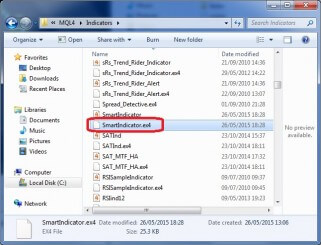
Step4
Step 5 – Restart your MT4 terminal and you will see your indicator appear.
Step 6 – Drag and drop your indicator onto the chart you want.

Smart indicator
Step 7 – Choose Inputs tab to change the defaults parameters if needed and press OK.
Now you can enjoy your new MT4 indicator and hopefully better Forex trading results.
For more advanced scripts, you can check the MQL5 Market